Without a doubt Hubspot is one of the most powerful CRMs on the market. With it, you’re tracking leads, managing customer relationships, running email campaigns, and monitoring sales pipelines. But without being able to cross-analyze that data with the data inside your various other softwares, you’re only scratching the surface of what your HubSpot data can tell you.
Your CRM contains thousands of interactions, behavioral patterns, and revenue signals. Your marketing hub knows which campaigns convert and which don’t. Your sales data shows exactly when deals stall and why. Your logistics software knows when things will be moving in and out. But connecting these dots manually? That’s where most teams struggle, while AI doesn’t. AI can transform HubSpot from a data collection tool into a decision-making engine.
What AI Can Do with Your HubSpot Data
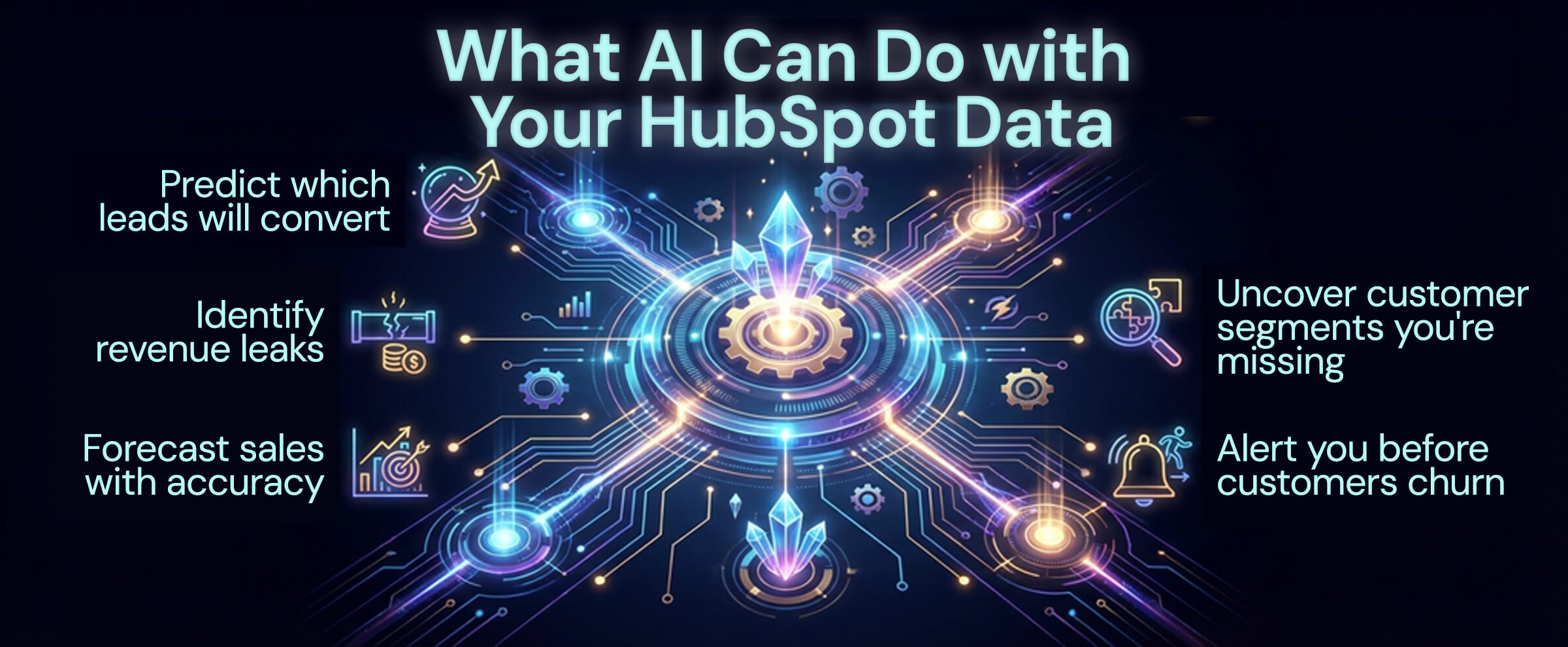
AI business intelligence doesn’t just visualize your HubSpot metrics—it analyzes patterns across thousands of customer interactions and tells you exactly what actions to take. Here’s an outline of the potential AI could make possible:
Predict which leads will convert – AI analyzes historical patterns to recommend actions on leads based on behavior, engagement, and demographics, helping sales teams prioritize the right prospects.
Identify revenue leaks – Machine learning spots where deals consistently stall in your pipeline and recommend specific interventions to keep them moving.
Forecast sales with accuracy – AI uses your HubSpot data to predict monthly and quarterly revenue within tight confidence intervals.
Uncover customer segments you’re missing – AI identifies high-value customer patterns that aren’t obvious in standard reports, revealing new market opportunities.
Alert you before customers churn – By analyzing engagement patterns, AI warns you when customer behavior changes in ways that typically precede cancellations.
The Problem: HubSpot Data Lives in Isolation
HubSpot excels at managing customer relationships, but your business data doesn’t live in just one place. Consider what HubSpot doesn’t know:
- Financial performance – Your actual revenue, expenses, and profitability (likely saved in Quickbooks)
- Product usage – What customers actually do with your product (likely saved in your app database)
- Support interactions – Customer health signals (likely saved in Zendesk or Intercom)
- E-commerce behavior – What they buy and when (likely saved in Shopify or WooCommerce)
- Project delivery – Whether you’re meeting customer expectations (likely saved in project management tools)
When HubSpot data stays isolated, you get an incomplete picture. You might see that a deal closed, but you don’t know if that customer is actually profitable. You track email open rates, but you don’t know if those opens correlate with product usage or revenue.
AI business intelligence solves this by connecting HubSpot to every other system in your business.
How AI-Powered Analytics Transforms HubSpot
Multiplatform connectivity
A valuable modern AI platform will integrate with HubSpot and all your other business tools simultaneously:
- CRM – HubSpot, Salesforce, Pipedrive
- Accounting – QuickBooks, Xero, FreshBooks
- E-commerce – Shopify, WooCommerce, Magento
- Marketing – Google Analytics, Facebook Ads, Mailchimp
- Support – Zendesk, Intercom, Freshdesk
- Project Management – Asana, Monday.com, ClickUp
- Cloud Storage – Google Drive, Dropbox, OneDrive
Once connected, AI analyzes relationships across systems that you’d never spot manually.
Conversations in Plain English
Instead of building complex HubSpot reports or exporting to spreadsheets, you simply ask:
- “Which campaigns generate the most profitable customers?”
- “Why did our sales pipeline slow down last month?”
- “What customer segments have the highest lifetime value?”
- “Which sales reps are best at moving deals from demo to close?”
- “Show me customers at risk of churning”
- “What content drives the most qualified leads?”
The AI understands these questions, pulls data from HubSpot and your connected systems, and provides comprehensive answers with specific recommendations.
Automatic Pattern Recognition
AI constantly monitors your HubSpot data looking for patterns:
Revenue patterns – “Your highest-value deals typically take 45 days and involve 7 touchpoints. Deals closing faster than this convert 40% less often.”
Behavioral signals – “Customers who attend webinars and download case studies are 3.2x more likely to convert than those who only engage via email.”
Temporal insights – “Your sales team closes 28% more deals on Thursdays. Consider scheduling final calls on Wednesday or Thursday.”
Risk detection – “Three of your top 10 customers haven’t engaged with your content in 30 days. This pattern typically precedes cancellation.”
Predictive Forecasting
AI analyzes your historical HubSpot data to forecast:
- Monthly and quarterly revenue (with confidence intervals)
- Pipeline conversion rates by stage
- Expected deal close dates
- Marketing qualified lead (MQL) volume
- Customer acquisition cost (CAC) trends
- Customer lifetime value (LTV) by segment
Instead of guessing or using simple averages, you get data-driven predictions that account for seasonality, trends, and business context.
Real-World Example: How AI Transforms HubSpot for Sales Teams
Meet Jason, VP of Sales at a B2B SaaS company. His team uses HubSpot to manage 200+ active deals. Before AI integration, Monday mornings looked like this:
Old Process (2-3 hours):
- Export HubSpot pipeline to Excel
- Pull closed deals from QuickBooks to see actual revenue
- Check support tickets to assess customer health
- Manually identify which deals need attention
- Try to forecast the month’s revenue
- Create reports for the executive team
With AI business intelligence:
Jason opens his dashboard Monday morning and sees:
- Pipeline health score: 82/100 (up from 78 last week)
- Forecasted monthly revenue: $287K (confidence: 87%, based on 47 active deals)
- Alert: 3 deals stalled – “ABC Corp has been in ‘Contract Review’ for 18 days. Historical data shows deals in this stage >14 days have a 62% close rate vs 89% average. Recommend CEO outreach.”
- Top opportunity: Enterprise segment – “Large companies (500+ employees) have 2.1x higher LTV than mid-market. Your team is only pursuing 12% of enterprise inbound leads.”
- Rep performance insight – “Sarah’s demos have a 73% next-step rate vs team average of 58%. Consider having her train the team on demo best practices.”
- Churn risk – “DataTech Inc. (your #3 customer by revenue) hasn’t logged into the product in 22 days and declined the last two touchpoint meetings. Recommend immediate executive intervention.”
Quite possibly the biggest return on all of that speed; Jason now knows where to focus his team’s energy quicker than ever.
How AI Improves Marketing ROI with HubSpot
Marketing teams face a different challenge: proving ROI and optimizing spend across multiple channels. But with a platform that can connect to Hubspot and your ads data – lets use Google Ads as an example – we start to get see the bigger picture.
Before AI:
- Paid search: 85 leads at $176/lead, 14% conversion rate
- Organic blog: 45 leads at $0/lead, 40% conversion rate
With AI:
- Paid search leads convert in an average of 18 days with 2.1 sales calls. Organic leads take 67 days and require 5.8 sales calls. When you factor in sales team time ($85/hour), total acquisition cost is actually $312 for paid leads vs. $423 for organic leads.
- Analyzing 18 months of QuickBooks data reveals paid search customers have a concerning pattern: 38% request refunds within 90 days (product wasn’t what they expected from ads), and 61% never make a second purchase. Organic customers have 7% refund rates and 73% make repeat purchases within 6 months.
- Paid search leads from ‘best price’ and ‘cheap’ keywords convert fastest but churn fastest. Paid search leads from educational keywords (‘how to choose,’ ‘comparison guide’) behave identically to organic leads—slow conversion but high retention.
AI Recommendation: “Don’t reduce paid search budget—restructure it. Eliminate ‘best price’ and ‘cheap’ keywords entirely (saving $4,200/month). Triple spend on educational keywords that attract organic-quality leads. Add negative keywords to filter price shoppers. Projected impact: same lead volume, 3.1x higher customer lifetime value, 68% reduction in refund processing costs.”
AI tracks the complete journey from first touch to closed revenue, attributing actual ROI to each channel and campaign.
Setting Up AI with HubSpot: Step by Step
Step 1: Connect Your Systems
Modern AI platforms offer one-click integrations; simply OAuth the AI platform to access HubSpot or enter your API key, and do the same for your other business tools. This at its core is the same process you used to connect your bank account to a budgeting app.
Step 2: Insights Activation
- Real-time view of sales, marketing, and customer health
- Dashboard alerts when something needs attention
- Weekly and monthly summaries
- Conversational analytics; ask questions anytime and get instant answers
Step 3: Continuous Optimization
AI improves over time as it learns:
- Which leads convert and why
- What messaging resonates
- Which sales activities drive deals forward
- How customer behavior predicts outcomes
Common Use Cases: AI + HubSpot
For Sales Teams:
Lead prioritization – AI can score leads based on a diverse range of parameters; such as conversion probability, purchase intent, engagement rate, and more, so your reps can focus on the right prospects.
Deal risk assessment – Know which deals are at risk of stalling or falling through based on historical patterns.
Optimal outreach timing – AI identifies when prospects are most likely to engage based on their behavior patterns.
Win/loss analysis – Understand exactly why deals close or fall through, with specific recommendations for improvement.
For Marketing Teams:
Channel optimization – Contrast multiple advertising platforms without leaving one dashboard.
Campaign ROI – Cross reference ad performance with billable hours information from your project management software.
Audience segmentation – Do an automated dive on analytical data without manually cross comparing
For Customer Success Teams:
Churn prediction – Get early warnings when customer engagement patterns suggest risk.
Upsell opportunities – Identify accounts showing signals of readiness for expansion.
Health scoring – Automated customer health scores based on product usage, support interactions, and engagement.
Proactive intervention – Know which customers need attention before they reach out with problems.
What to Look for in an AI Platform for HubSpot
When evaluating AI business intelligence platforms, prioritize:
Multi-system connectivity – HubSpot is just one piece. You need a platform that connects your CRM, accounting, e-commerce, and other tools simultaneously.
Plain-English queries – You shouldn’t need to learn a new language. Ask questions naturally and get answers.
Affordable pricing – Enterprise BI tools cost $50,000+/year. Modern AI platforms for SMBs typically run $150-400/month.
Common Questions About AI and HubSpot Integration

No. AI platforms read your HubSpot and other program data in the background via API connections. They don’t modify your workflows, add fields, or impact performance. HubSpot continues working exactly as it does now.
Reputable AI business platforms access your data through secure API connections, and your data stays in the program it was made in. They won’t actually save your data to a secondary database, rather read it through the API and display the results to your screen.
Not at all. Your sales and marketing teams continue their normal HubSpot workflows. The AI platform works in the background, providing additional insights without disrupting existing processes.
We get it; migrating your team onto yet another platform is a lift; setup, training, rollout, cost, etc. You want to make sure its worthwhile before you bite. Most AI platforms offer some variation of a free trial. Connect your data, explore the insights, and see if it delivers value before committing.
That’s exactly who these platforms are designed for. If your team can use the internet and check email, they can use AI business intelligence. No SQL, no coding, no data science required.
Beyond HubSpot: Connecting Your Entire Business
While HubSpot AI integration is powerful on its own, the real magic happens when you connect your CRM to your entire business ecosystem.
For example, many businesses use both HubSpot for customer relationships and QuickBooks for accounting. When these systems work together through AI:
- See true customer profitability – Which HubSpot customers actually generate profit vs those who cost more to serve?
- Optimize sales compensation – Align commissions with actual collected revenue, not just booked deals
- Cash flow forecasting – Combine HubSpot’s pipeline with QuickBooks cash flow data for accurate financial planning
- Marketing ROI – Track marketing spend (QuickBooks) to revenue generation (HubSpot) with complete attribution
If you’re interested in how AI can transform your QuickBooks data alongside HubSpot, check out our companion guide: How to Get the Most Out of QuickBooks with AI. Many businesses find that connecting their CRM and accounting systems reveals insights neither system could provide alone.
The Future of CRM is AI-Powered
HubSpot revolutionized how businesses manage customer relationships. AI is now revolutionizing how businesses understand those relationships.
The companies that win in 2026 and beyond won’t be those with the most data—they’ll be the ones who turn data into decisions fastest. AI makes that possible for businesses of any size.
Take the Next Step: See AI Business Intelligence in Action
Reading about AI capabilities is one thing. Seeing your own business data transformed into actionable insights is another entirely.
That’s why we built ROAI —an AI business platform designed specifically for small and medium-sized businesses. We integrate with Hubspot, Quickbooks, Gmail, Outlook, Shopify, Stripe, Google Drive, Odoo, Paypal, Sharepoint and Woocommerce.
Here’s what you get:
Simple integrations – Connect easily and quickly
Automatic daily insights – Wake up to a dashboard showing what matters
Plain-English questions – “Show me my most profitable products”
Cash flow forecasting – Know what’s coming 30-90 days ahead
Connect your data and see what real insights AI discovers about your business.